Enterprise workflow
Turning Excel into the submission itself — for a report seen by Parliament
Every year, hundreds of public-sector enterprises retyped a year of Excel data into a seven-step government portal — for figures that go before Parliament. I stopped trying to replace the spreadsheet and made it the submission.
- Role
- UX Designer — research, interaction, and rollout
- Timeframe
- 2024–25
- Context
- Public Enterprises Survey portal · Department of Public Enterprises, Ministry of Finance
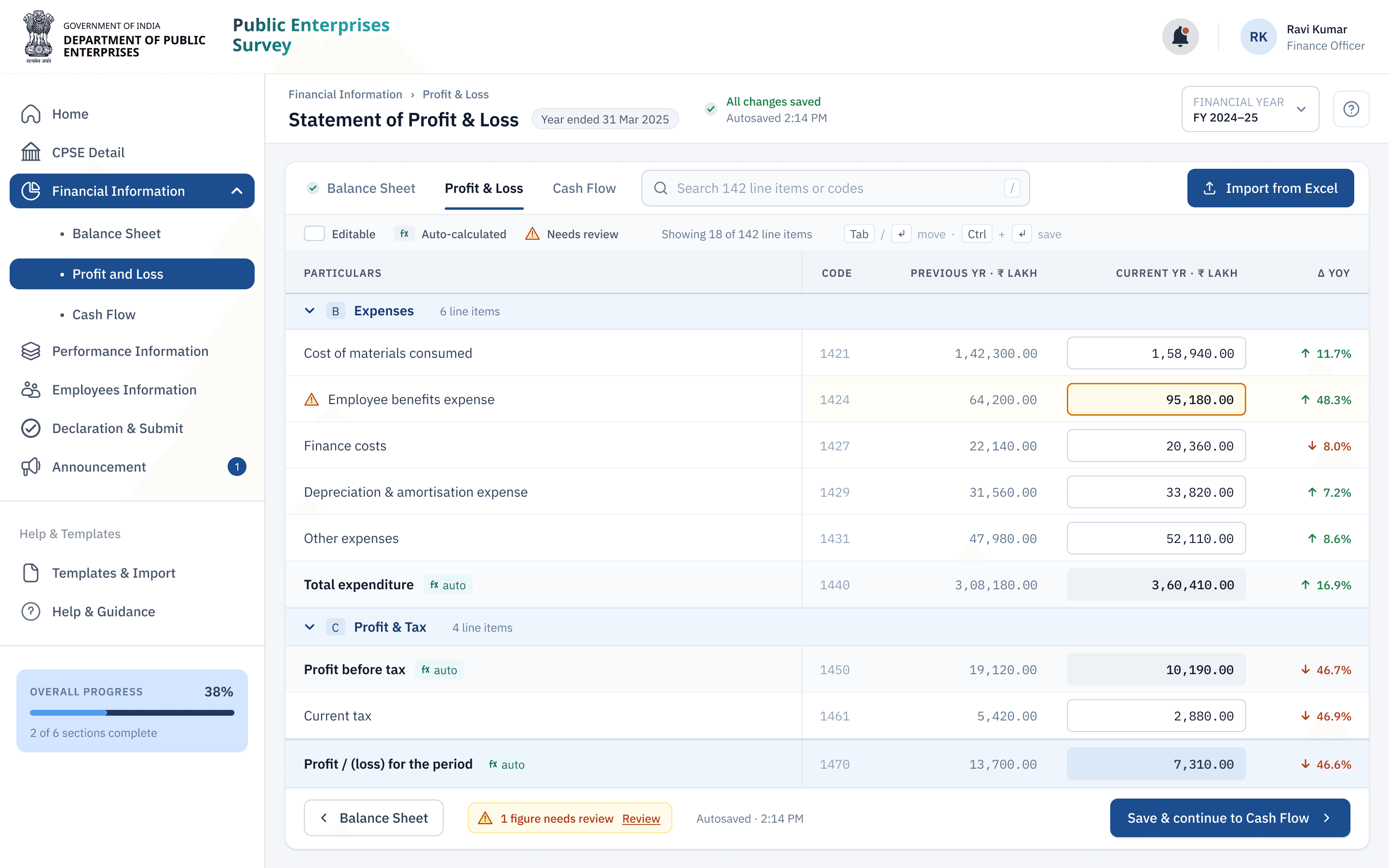
Some details are abstracted to respect government / NDA constraints; figures shown are approved for sharing. Ask for more in conversation.
Once a year, the financial health of every Central Public Sector Enterprise in India is compiled into a single report and laid before both Houses of Parliament. The Public Enterprises Survey is mandatory, high-stakes, and unforgiving of error.
The data behind it was being assembled by hand.
A report read in Parliament, assembled by copy-paste
Finance teams kept their numbers in Excel all year — structured workbooks they knew cold. Then, near the deadline, they opened a seven-step web portal and retyped everything: hundreds of values copied across, dependent figures recalculated by hand, the same information entered more than once. It was slow, draining, and exactly the kind of manual work that breeds mistakes in numbers no one can afford to get wrong.
We did the whole year in Excel, then did it all again inside the portal. It felt like reporting twice.
The brief I was handed was “make the form easier.” The deeper problem was that the form existed in the wrong place.
Where the real work happened
I spent the first weeks watching finance teams prepare a submission. One thing was obvious within the first session: the portal wasn’t their workspace. Excel was. They lived in those workbooks for months and only opened the portal at the deadline to transcribe them.
The portal acted like the system of record. The spreadsheet already was one.
That reframed the project. The goal wasn’t a cleaner seven-step form. It was to stop making people do their year’s work twice.

Designing with the spreadsheet, not against it
If Excel was where the work lived, the redesign had to meet it there — not ask people to abandon a year of habit at the deadline. Four ideas anchored every decision.
The reporting loop, redesigned

The move that did most of the work
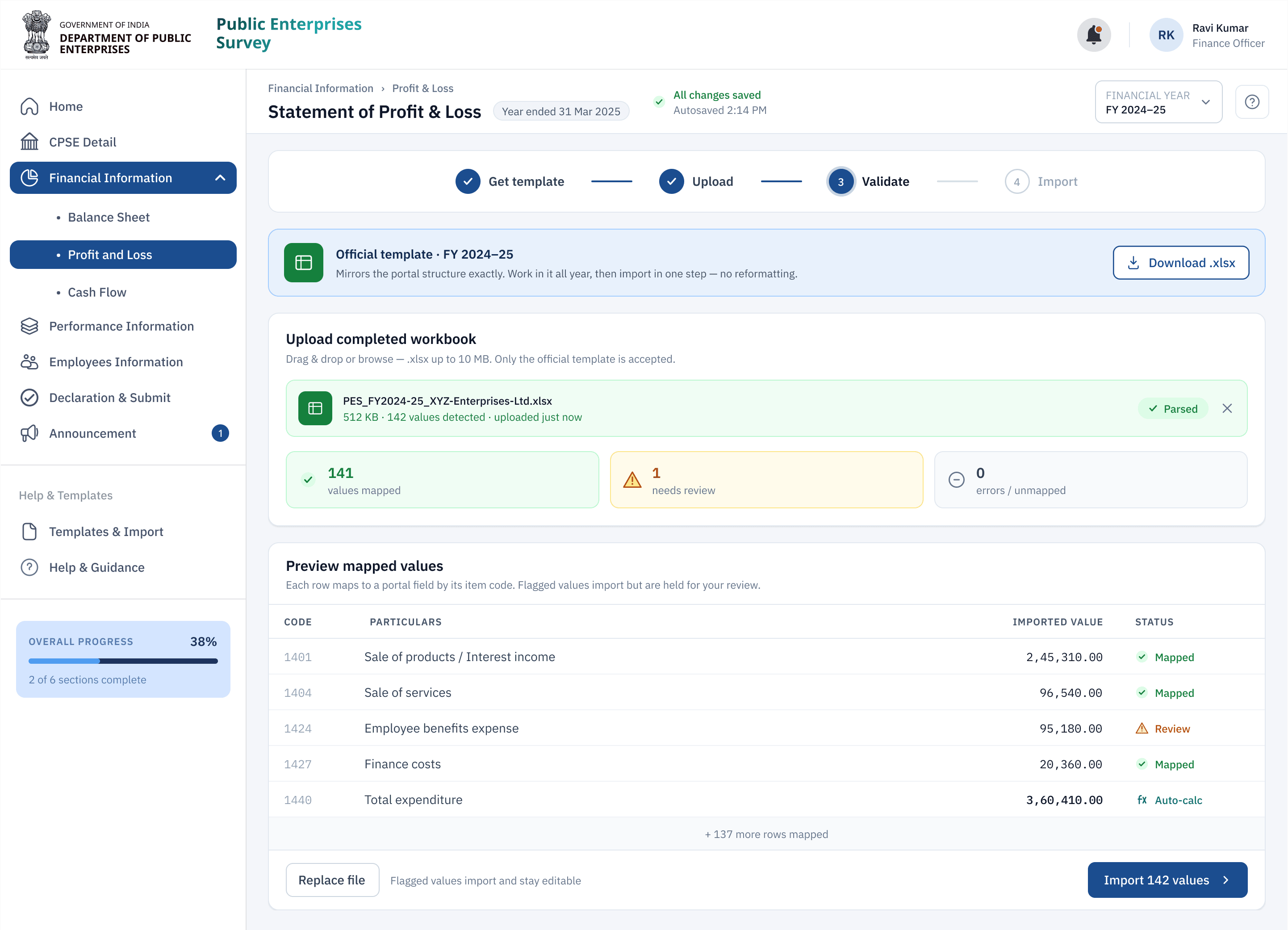
I could have built a better importer and called it a win. Instead I redesigned the process around it. Before every cycle, each organisation now receives an official Excel template that matches the portal’s structure exactly. They keep working in Excel all year — the way they always have — and at the deadline the whole workbook imports in a single step, clean.
The catch was adoption. NIC — the team building and maintaining the portal — asked the fair question: why would enterprises use our template at all? The answer was to make it not feel like ours. Instead of handing out a blank new format, I collected the workbooks 25 enterprises had kept for years, studied how each was structured, formatted, and driven by formulas, and rebuilt the portal template to mirror them: same layout, same formulas, nothing new to learn. Asked directly, all 25 said the same thing: if it matches what we already use and adds no work, we’ll use it. A template only works when it disappears into a habit people already have.
I didn’t design an import button. I redesigned the year around it.
From there, a submission that used to take days of transcription became a short, guided pass:
- 01Start from the official template
The portal’s structure, shipped as the spreadsheet teams already use — so the year’s work lands in the right shape from day one.
- 02Import in one step
The completed workbook uploads directly, with validation catching mismatches before they become problems.
- 03Let the portal do the math
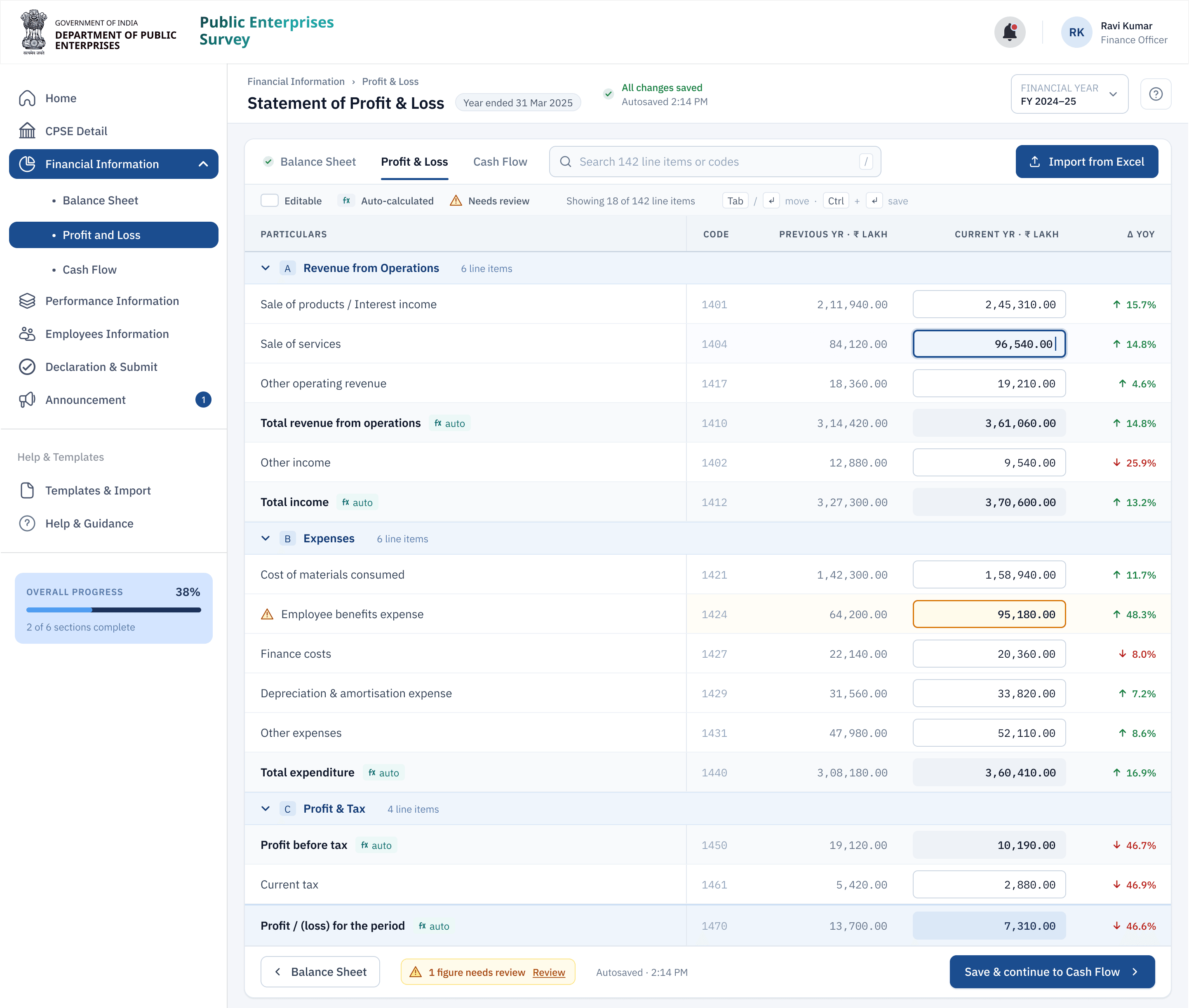
Every dependent figure is calculated as source values arrive — no manual recalculation, far fewer errors.
- 04Review only what matters
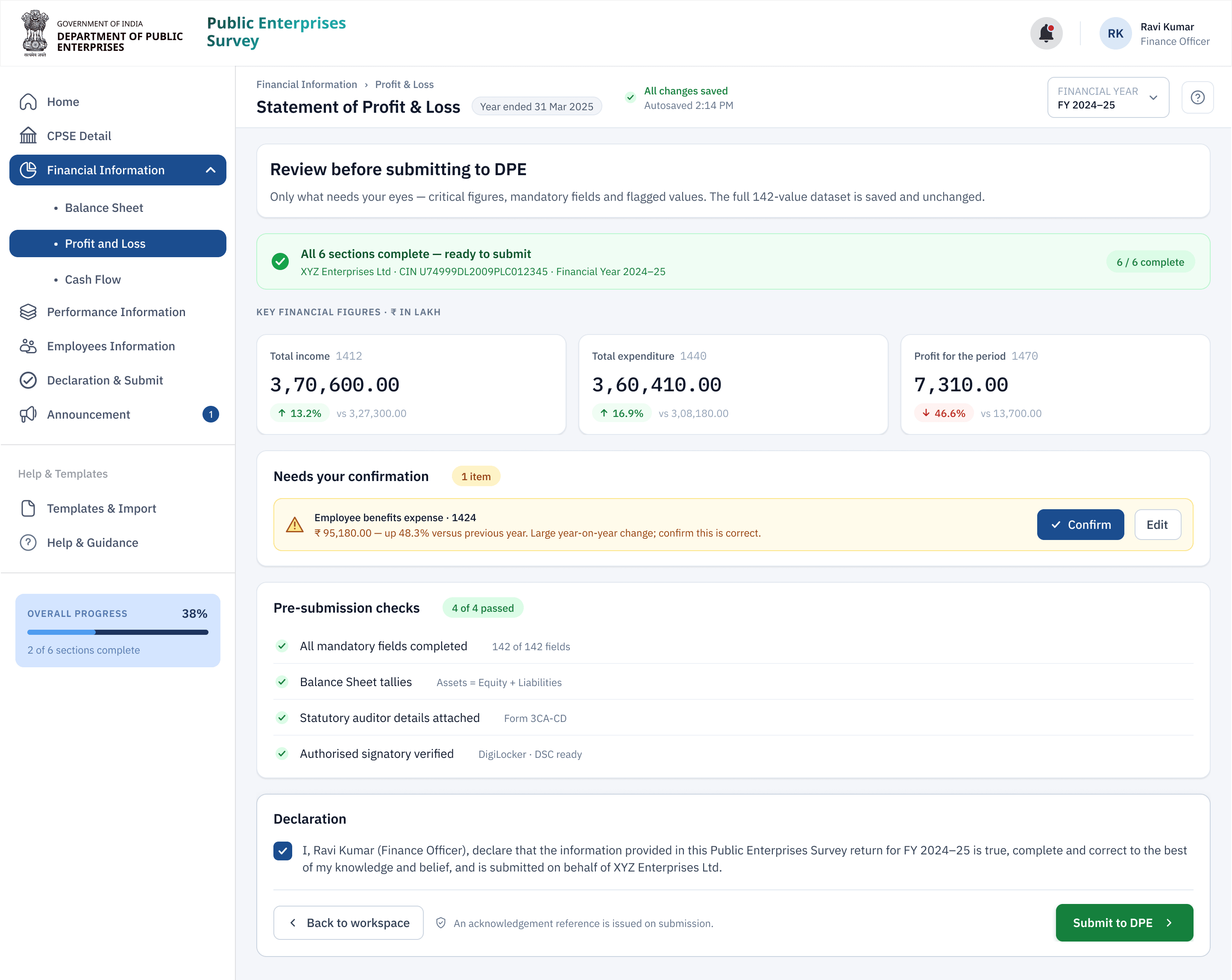
The final check surfaces critical figures, mandatory fields and warnings — not the entire dataset — so confidence is high and review is fast.
The one-step import
The real fight was trust, not design
Making a spreadsheet the front door to a report seen by Parliament set off exactly the objection it deserved. The department’s IT leadership — up to the Joint Secretary — wanted to know how anyone could trust a file uploaded from outside the portal.
NIC’s security team answered first: stamp each official template with a server-side signature, so no foreign sheet could take its place. Necessary, but not enough — a signed template still couldn’t prove who stood behind the numbers inside it. So I proposed binding every upload to a person: a CDAC e-Sign, tied to the account holder’s official email, so a submission carried accountability, not just data. The Joint Secretary still wasn’t satisfied — until I pointed to a precedent the department already relied on. e-Office runs on e-Sign alone; and here the file never leaves the PSU or CPSE, so no outsider can touch it. That landed, and approval followed.
Two smaller stands mattered as much. Section officers were wary of losing the seven-step form they use to keep their records. So I kept all seven, for verification and preview, and automated only the entry beneath them. I wasn’t trimming their process; I was removing the typing. And I made one deliberate bet: lock every cell but the inputs, so any workbook that kept its structure could be trusted to import cleanly. A few enterprises broke the structure anyway — so I redesigned the import to fail softly instead of dead-ending: a broken workbook lets the user skip the failed import and key the data straight into the same flow, rather than being turned away to start over. I made the bet because I’d planned for the day it wouldn’t hold.
The unglamorous parts that mattered most
Finance professionals navigate by keyboard, work in long sessions, and can’t afford to lose a morning’s input. So the redesign was keyboard-first, saved progress automatically after every field, and held to accessibility standards as a baseline — not a finishing touch. None of it photographs well. All of it is why people trusted the new flow under deadline pressure.
Getting it in before the deadline
I pushed to open the submission window a month earlier than usual — which meant clearances across several departments, and a few rooms where the answer started as a flat no (and a raised voice or two). With the NIC HOD backing the case, I got it. Then I put the flow in front of 37 enterprises before full rollout, and the test earned its keep: people couldn’t always tell whether every value had imported cleanly. So the design grew per-field error states — a missing or mismatched value surfaces against its own field code — with inline tooltips and a first-run walkthrough. It shipped within the month.
What changed
The redesign didn’t add technology so much as remove redundant work — and the time came straight back.
Now the portal works the way I already work. I’m not reporting the year twice anymore.
What I took from it
The design was the easy half. The real work was earning trust — convincing the people who guarded the portal that the safest thing they could do was let go of it, and that a spreadsheet carrying a government signature was more accountable than a form filled in by hand.
It’s the lesson I keep relearning in enterprise UX: you rarely win by introducing a new tool. You win by understanding the one people already trust — then doing the slow, unglamorous work of getting everyone who protects the system to trust it too.
Impact figures come from a post-rollout survey of around 100 finance staff across participating enterprises. Screens are shown with the department’s permission — dummy data, no enterprise names, and some steps abstracted to respect government confidentiality. Happy to go deeper in conversation.